
Ruins of Dawn Demo Guide
Make the most of RuinsofDawnDemo — learn systems, test classes, and prepare for the Aug 14, 2026 Steam release.
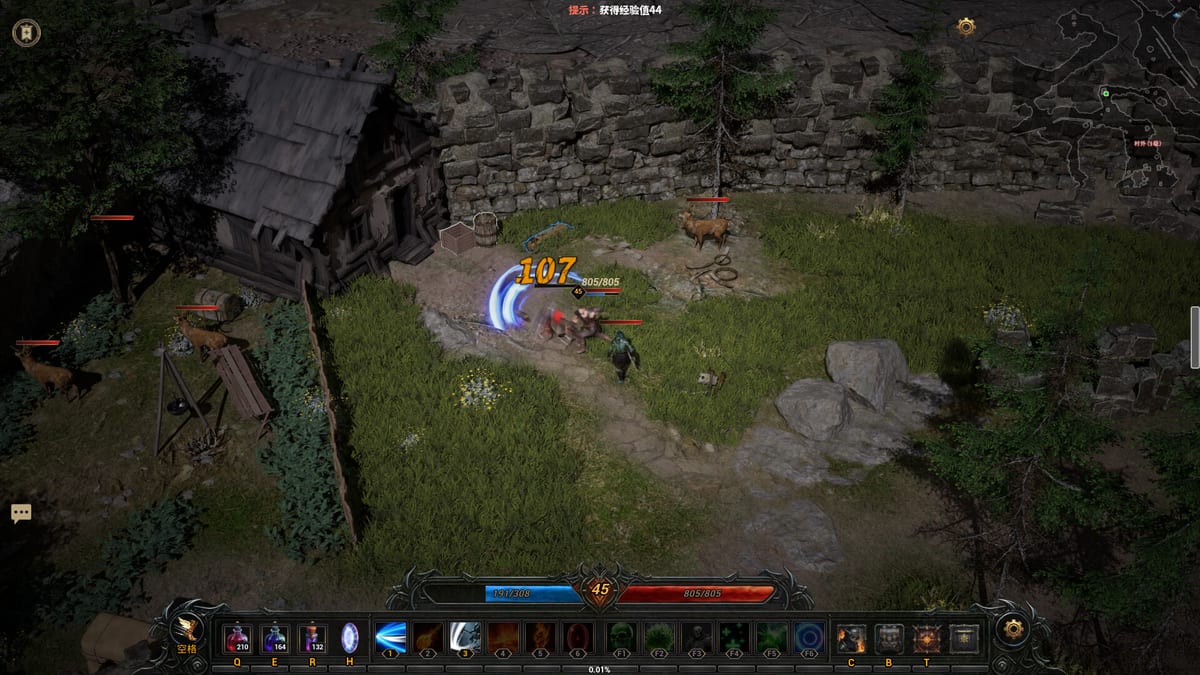
The RuinsofDawnDemo on Steam is the primary way to experience Ruins of Dawn before its planned August 14, 2026 launch. The demo went live around June 4, 2026 under the Steam app name RuinsofDawnDemo — search that exact string if the store hub link moves between patches.
The preview is an isometric loot ARPG slice from 刷宝爱好者 that exposes core loops — random affix gear, class switching, forging hooks, elite pressure, and online co-op — without pretending to be the full endgame map set. Recent content updates have expanded the playable slice with midgame zones like Bear Valley and T3 gear tiers; those additions roll out through demo and playtest builds rather than waiting for full launch. Track patch notes on Updates when your install size jumps or new map portals appear.
This demo guide explains what to expect from preview builds, how to structure practice sessions, and which wiki pages to read when you hit demo-specific walls. It complements the demo review, release date tracker, and system requirements reference.
Finding and Installing RuinsofDawnDemo
Search RuinsofDawnDemo in the Steam client or open the Ruins of Dawn store hub and follow the demo install button when available. Download size and exact content caps can change between previews; note your build version in the demo tracker so advice from friends matches yours.
Before first launch:
- Confirm your PC meets the guidelines on system requirements.
- Skim Getting Started for class and loot vocabulary.
- Keep Controls handy — demo difficulty spikes when movement binds are unfamiliar.
What the Demo Typically Teaches
Preview builds focus on repeatable ARPG literacy rather than full campaign closure. Expect to interact with:
- Three classes — Warrior, Mage, and Warlock — with anytime switching so you can test roles in one save.
- Random affix gear with fraction displays (such as
/5) signaling roll quality. - Forging pillars — extract, inject, reforge, upgrade quality — even if not every late recipe is unlocked.
- Elites and bosses that introduce telegraph discipline.
- Rift invasions, Rift Key trials, Ruin Gem ruins, and bounties where the preview gate allows — see Rifts, Trials, Ruins, and Bounties for system context.
- Online co-op matching the full game’s cooperative intent.
Demo boundaries may omit late zones, cap item tiers, or reset progress between major patches. Content updates — including Bear Valley, T3 gear, and guarded chests — arrive through demo and playtest patches first; read Updates after each Steam download so your session plan matches the current build. When in doubt, treat progress as practice, not guaranteed carryover — the release date page summarizes launch expectations separately from preview saves.
Recommended Demo Session Plan
Session 1 — Movement and Class Feel
Spend ninety minutes learning bindings from Controls: dash on Space, lock on backtick, auto-attack on G, skills on 1–6 and F1–F6, potions on Q/E/R, town portal on H. Rotate all three classes once. Note community impressions: Mage often clears early packs quickly, Warlock feels safer with pets, Warrior rewards patience for late single-target.
Log first impressions in the class tier list margins — demo balance can shift.
Session 2 — Affix Literacy and Stash Rules
Farm until your inventory overflows, then sort using gear items guidance:
- Keep high-fraction rolls on useful affixes.
- Bank five-affix pieces even if unusable today.
- Vendor low-fraction duplicates unless they fill a resist gap.
Legendaries are exciting, but demo players frequently report that DIY forged gear eventually beats weak legendaries. Do not vendor a god-roll rare because a orange border appeared.
Session 3 — Forging Practice
Follow Progression and execute one safe crafting loop:
- Choose a duplicate donor you can lose.
- Extract one affix — remember extraction destroys the item.
- Inject onto a five-affix base if materials allow.
- Reforge or upgrade quality only when you understand cost.
Deep recipes live on Forging builds and the affix glossary.
Session 4 — Co-op and Harder Content
Party up using Co-op etiquette: shared target calls, potion awareness, and agreeing when someone uses H portal. Push a Rift invasion or trial key if unlocked, then pick a bounty target that reinforces your weakest resistance.
Session 5 — Bear Valley and T3 Targets
After recent content updates, demo players with stable forging habits should test Bear Valley on normal difficulty. Aim for T3 gear on weapon and chest using gear tiers as a checklist, then note where hard mode walls appear. If clears slow, pivot to farming routes and guarded chests before blaming class choice.
Demo Routes Worth Repeating
Efficient demo farming is not about min-maxing every drop — it is about touching each system so launch day feels familiar:
| Loop | Skill trained | Wiki follow-up |
|---|---|---|
| Elite pack clear | Dash timing, lock discipline | Controls |
| Boss attempt | Phase learning, potion pacing | Beginner builds |
| Rift defense | Wave priority, co-op spacing | Rifts |
| Ruin Gem run | Route memory, gem rewards | Ruins |
| Bounty turn-in | Targeted farming | Bounties |
| Bear Valley run | T3 drops, midgame pacing | Bear Valley |
| Guarded chest route | Bonus loot under pressure | Guarded chests |
Repeat loops until fractions (/5) become instinct. That instinct matters more in launch endgame than memorizing one boss pattern.
Class Switching in the Demo
Because classes swap freely, use the demo to test gear universality:
- Craft neutral affixes (life, resist, generic damage) before class-specific injects.
- Keep one kit per role in stash tabs if the preview supports tabs.
- Compare solo clear speed versus co-op utility using Classes pages.
Switching mid-session also teaches whether your keybind layout survives role changes — another reason to standardize F-keys across kits.
Demo Limitations and Preview Etiquette
Preview software can crash, desync co-op, or wipe saves when patches land. Mitigations:
- Screenshot five-affix items before experimental extracts.
- Note crafting materials in the demo tracker.
- Report bugs through official channels rather than wiki comments.
Avoid treating leaked or datamined content as confirmed; this guide sticks to publicly described demo systems and store materials.
From Demo to Full Launch
When Ruins of Dawn leaves early access or launches on the planned Aug 2026 date, your demo skills transfer even if numbers reset:
- Affix fraction reading.
- Extract/inject risk management.
- Co-op communication.
- Class swap flexibility.
Re-read Getting Started at launch for economy changes, then jump straight into Progression for tier-wide forging routes. Watch Updates for post-launch patches that mirror demo content cadence. Pair written guides with the embedded demo gameplay video on this page, and share feedback if preview patches change routes — demo guides evolve quickly.
Frequently Asked Questions
Quick answers to the most common questions.
When did the Ruins of Dawn demo release?
**RuinsofDawnDemo** went live on Steam around **June 4, 2026**. Follow [Updates](/review/updates/) for content patches that add maps like [Bear Valley](/systems/bear-valley/) and T3 gear.
How do I download the Ruins of Dawn demo?
Search **RuinsofDawnDemo** on Steam or use the demo button on the Ruins of Dawn store page. Verify free space via [system requirements](/review/system-requirements/).
Will demo progress carry over at launch?
Preview saves may reset or stay separate. Treat demo gear as practice and follow [release date](/review/release-date/) updates rather than assuming carryover.
Which class should I demo first?
[Mage](/classes/mage/) for early clears, [Warlock](/classes/warlock/) for safe pets, or [Warrior](/classes/warrior/) for late boss focus — you can swap anytime per [Classes](/classes/).
What should I practice before launch?
Affix fractions, five-affix stash rules, one safe [extraction](/builds/forging/), and co-op calls from [Co-op](/guides/coop/). Track milestones in the [demo tracker](/tools/demo-tracker/).
Does the demo include co-op?
Ruins of Dawn supports online co-op; the demo exposes it when preview servers allow. Read [Co-op](/guides/coop/) for party tips.